Found by itself
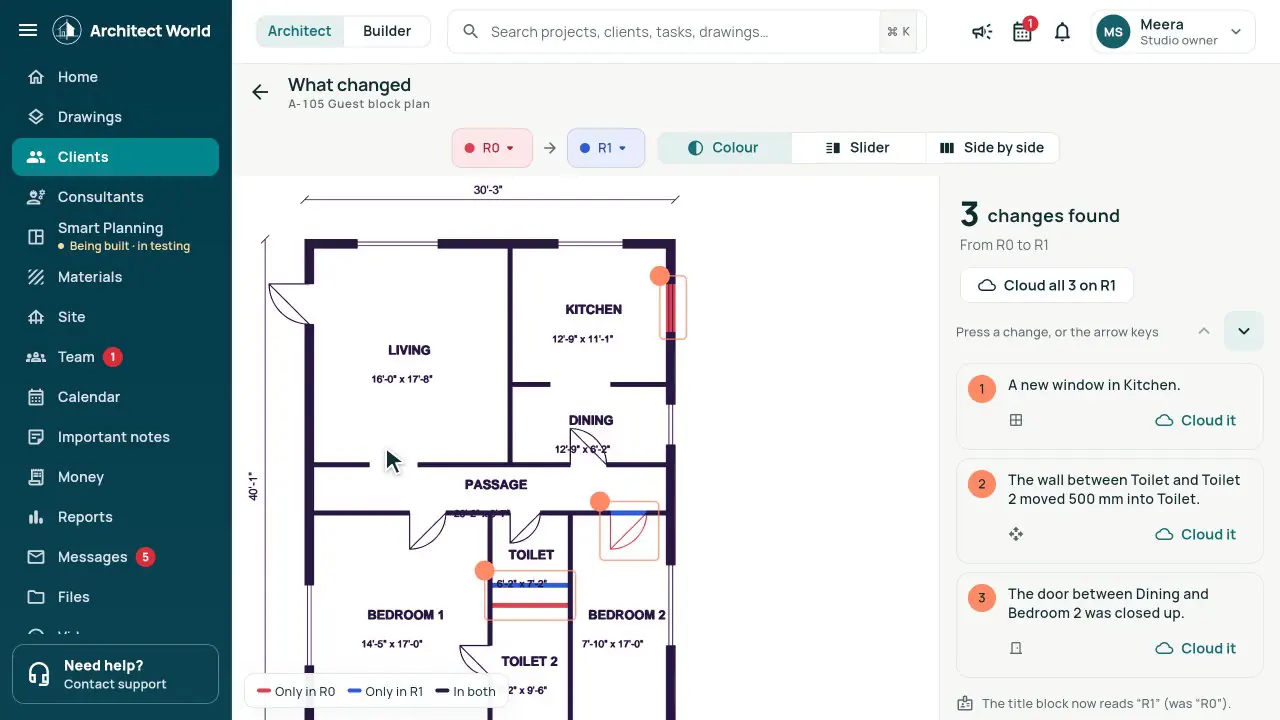
Every change between two revisions is found and boxed; the title block’s own change is set aside.
What changedNew
Open a revised sheet: a band says it changed since you last looked. One press shows the two latest revisions over each other and lists every change in plain words. Next takes you to each; Cloud it marks it on the new sheet.
Sound familiar?
R4 arrives. Is it the toilet wall, the window, or just the title block? We lay two prints on the light table, or flick between two PDFs, and still miss the door that was closed up.
Every change between two revisions is found and boxed; the title block’s own change is set aside.
“The wall between Toilet and Toilet 2 moved 500 mm into Toilet.” You read it before you look for it.
Cloud it draws the revision cloud on the new sheet with its triangle; Cloud all does them all.
Revised: every time a consultant or your own team sends a new revision.


Real screens from our demo studio, Atelier Neev (fictional data).
It compares what is drawn, so two vector PDFs compare best; scans are compared from their pictures and their changes boxed.
Lines, walls, doors, windows and words that moved, appeared or went. The title block’s revision letter is listed apart, so it never hides a real change.
Yes. Pick any two revisions of the sheet at the top of the compare.
Coming soon
We’re launching very soon. Leave your name and an email or a mobile number, and we’ll tell you the day it opens.