Drawings on siteNew

Tap the spot. Say it. It is on the right desk.

Point a phone at the print: it says if it is the latest. Tap the problem on the sheet, say what is wrong and Send. No signal? It waits and goes by itself.
Sound familiar?

The contractor builds from a print that was revised last week. The site engineer calls, the architect is in a meeting, and the photo of the problem arrives on WhatsApp with no idea which drawing, which wall, which revision.

What changes

01

Is this the latest?

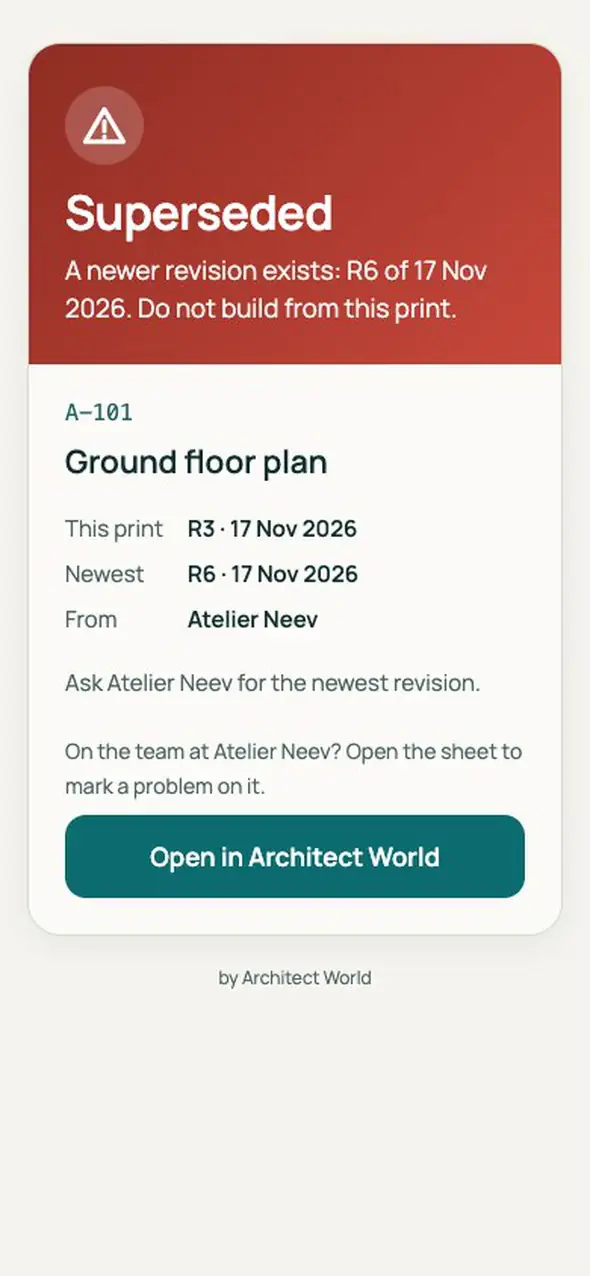
Any phone camera on the print’s QR: Current in green, or Superseded with the newest revision, no sign-in.

02

Pinned where it is

The query sits on the spot of the sheet, with its photo and words, assigned to a person with a date.

03

No signal, no problem

Sheets seen once stay on the phone; marks wait and send themselves when the signal comes back.

Measured, not promised

  • 19 sfrom the sheet to a sent query on a phone, in five presses
  • 4 sfrom a printed sheet’s QR to Current or Superseded, no sign-in
  • 5 of 5site jobs that still work with the network cut
Measured in our own tests: drawings we made in a dozen CAD styles, scans and photos included, on the app as it is today.

Where it sits in a drawing’s life

  1. A set arrives
  2. On site
  3. Revised
  4. Issued
  5. It asks
  6. The whole house
  7. Change it

On site: every day of construction, where the drawing meets the building.

What it does

  • A QR in every print’s margin opens a page that says Current or Superseded, and nothing secret; the team opens the latest sheet from it.
  • The site engineer’s sheet opens with the pin ready: tap, photo, words said or typed, Send to the drawing’s architect.
  • Any mark can be assigned to a person with a due date; it shows in their bell and on My day.
  • Measure in real sizes from the title block’s 1:100 (or calibrate on two points), in metres or feet and inches; areas and counts too.
  • Keep a project offline: its sheets, lists and marks on the phone or iPad; what you do waits and sends itself.
  • One link for the site that always opens the newest revision.

In the app

Measured in real sizes from the title block’s 1:100: lengths, an area, a count, beside the marks.
The print’s QR: Superseded, R6 is the newest.
The current sheet opens with the pin ready.
Tap the spot and say what is wrong.
Sent to the architect.

Real screens from our demo studio, Atelier Neev (fictional data).

Questions

Does the site engineer need a computer?

No. Everything on site is made for a phone or an iPad; the pin is ready when the sheet opens.

What does the QR page show to a stranger?

Only whether the print is current, the sheet number and title and the studio’s name. Nothing else, and the link can be switched off.

How exact are the measurements?

On our 1:100 test sheet the three known lengths and the room area came out exact, read from the title block’s scale. You can calibrate on two points when a sheet has no scale.

Coming soon

Sign-up is coming soon

We’re launching very soon. Leave your name and an email or a mobile number, and we’ll tell you the day it opens.

See everything we’ve shipped

An email or a mobile number is enough.

We use these details only to tell you when sign-up opens.