One setting, everywhere
The portal, shared links, emails, invoices, proposals, BOQs, orders and agreements.
Your brandingNew
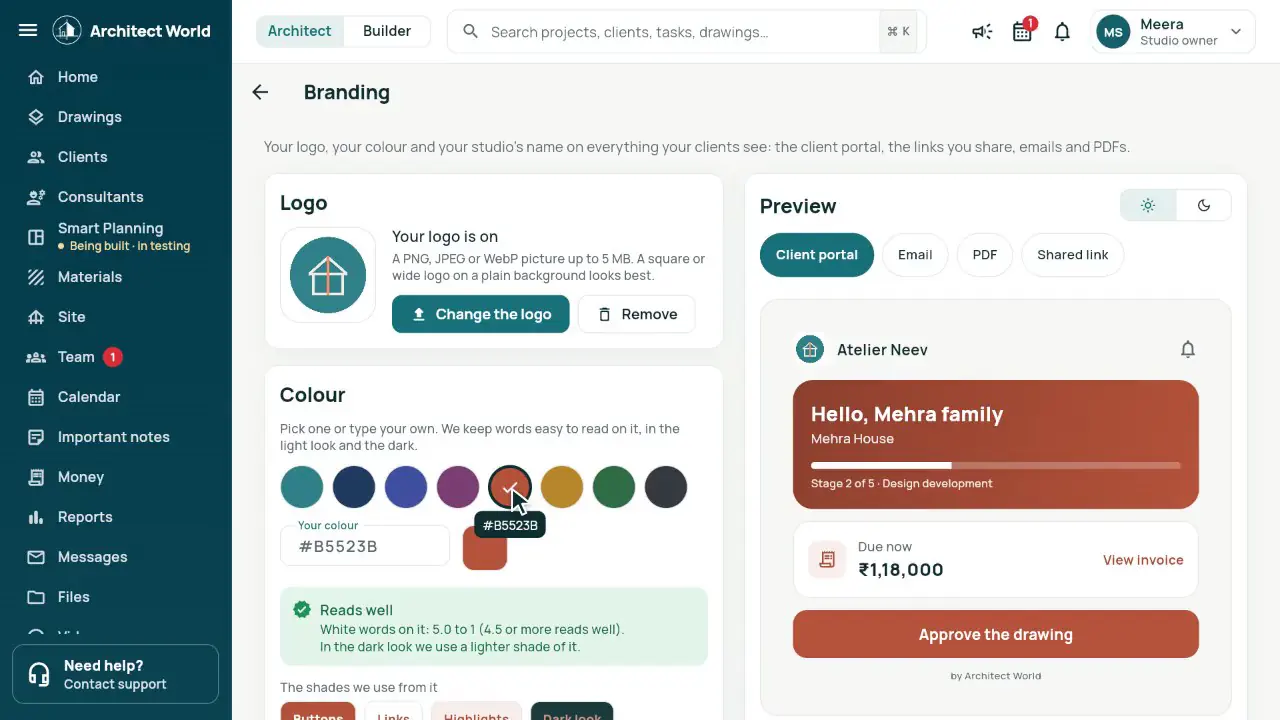
Upload your logo and pick your colour. The portal, the links you share, your emails and every PDF follow, with a live preview, and words that stay easy to read on any colour.
Sound familiar?
We spend years on our studio’s identity, and then the client receives an invoice in someone else’s colours, from a portal with someone else’s name on top.
The portal, shared links, emails, invoices, proposals, BOQs, orders and agreements.
A live preview of the portal, an email, a PDF and a shared link, light and dark.
Any colour you pick is checked for contrast; the dark look gets a lighter shade of it.
Everywhere a client meets you: proposals, invoices, the portal.


Real screens from our demo studio, Atelier Neev (fictional data).
Not yet. Your name, logo and colour are on everything; a domain of your own comes later.
We check the contrast and adjust the shades we use, so words stay readable in light and dark.
Your team sees a small preview in Settings; the look is for your clients: portal, links, emails and PDFs.
Coming soon
We’re launching very soon. Leave your name and an email or a mobile number, and we’ll tell you the day it opens.