Issue a setNew

Ten sheets to three people, with a transmittal, in a minute.

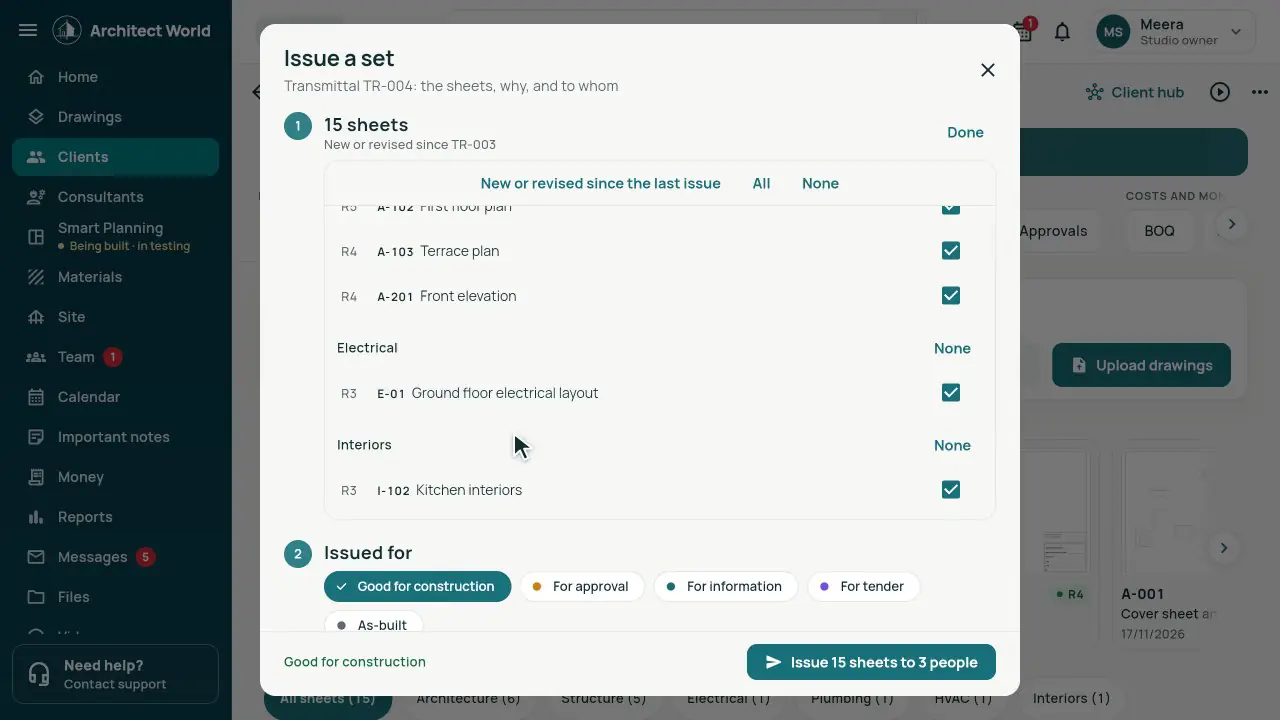
Choose the sheets (new or revised since the last issue are picked for you), say what they are issued for, and who gets them. Each person gets their own link; you see who opened what, and a numbered transmittal is on file.
Sound familiar?

We send the drawings on WhatsApp to six people, one PDF at a time. Two weeks later the contractor says he never got R3, and nobody can say who was sent what.

What changes

01

Done in a minute

New or revised since the last issue, already picked; Good for construction, For approval, For tender.

02

Who has what

Each person’s opens and Received, sheet by sheet; the register shows what was issued to whom.

03

Answers come back

A consultant sends a marked-up PDF or photos back from their page; you see it per person, in the bell.

Measured, not promised

  • 42 sto issue 15 sheets to a client, a new contractor and a new consultant, with the transmittal
  • 4 pressesfor a revised set of 12 sheets to three people, from the Sheets view
  • 10 sto send the next set to the same people
Measured in our own tests: drawings we made in a dozen CAD styles, scans and photos included, on the app as it is today.

Where it sits in a drawing’s life

  1. A set arrives
  2. On site
  3. Revised
  4. Issued
  5. It asks
  6. The whole house
  7. Change it

Issued: when a set goes out for approval, for tender or for construction.

What it does

  • Issue a set from the Sheets view or the register: the sheets, what they are issued for and who gets them.
  • The client, the contractor and consultants from the project, or someone new with a name and a mobile or an email.
  • Each person’s own page: the sheets stamped with the transmittal number, Good for construction, and Received.
  • The transmittal PDF with its number, the sheets and revisions, the people and how it was sent.
  • Who opened what, per person; the register’s Issued column; reminders for those who have not opened it.
  • Consultants send their marked-up drawings back on the same page; you see them per person.

In the app

Issue a set: the sheets new or revised since the last issue.
Good for construction, to three people.
TR-004 issued: each person their own link.
A consultant’s page on a phone: the sheets, Received, and their markups sent back.

Real screens from our demo studio, Atelier Neev (fictional data).

Questions

Do the people I send to need an account?

No. Each opens their own link on any phone or computer; the client sees it in their portal too.

Can I switch a link off?

Yes. Each person’s link can be turned off; the page then says so and shows nothing.

What is on the transmittal?

Its number, the date, what the set is issued for, each sheet with its revision and title, and who it went to and how.

Coming soon

Sign-up is coming soon

We’re launching very soon. Leave your name and an email or a mobile number, and we’ll tell you the day it opens.

See everything we’ve shipped

An email or a mobile number is enough.

We use these details only to tell you when sign-up opens.