What you need
- A studio account with Smart Planning switched on (it is in preview, and sign-up opens soon). Owners, architects and draftsmen can draw.
- A computer or a tablet: phones show the plan but can’t draw.
- A project, and the plot’s size (or ask the app to recommend one).
Steps in the app
- Open Smart Planning in the sidebar and press New plan.
- Pick the project, the Building type and the Units (Feet and inches, Feet or Metres). Enter the plot as length × width, or press Recommend a size. List the Rooms the client wants and press Create plan. Use the example fills in a sample house.
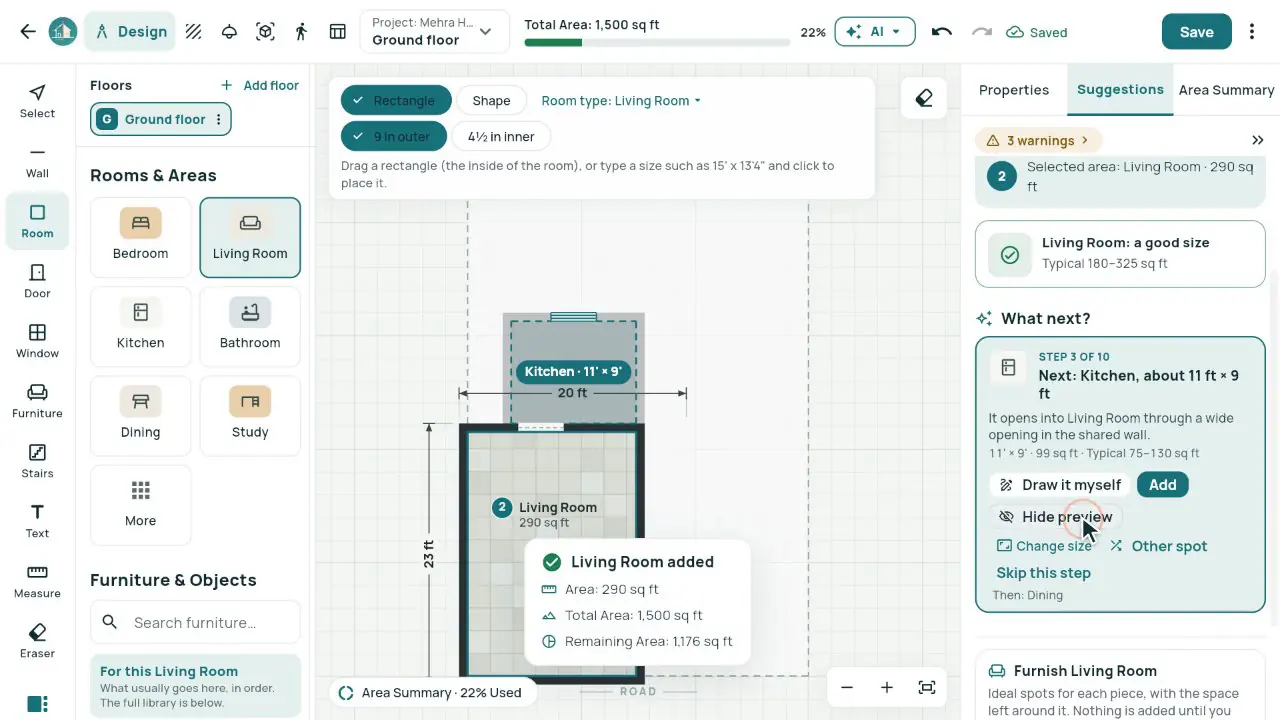
- Draw rooms with the Room tool (R): drag the inside of the room, or type its size, like 12 x 14, and click to place it. Or draw walls with the Wall tool (W), click by click or by typed lengths: 9 in outer walls and 4½ in inner walls.
- Add doors (D, 3 ft by default) and windows (N, 4 ft by default) on the walls, then stairs (S), furniture (F) and text (T). Measure (M) any distance.
- Use the right panel: Suggestions (Plan steps, What next?, Suggest furniture for this room and the design checks) and the Area Summary.
- Add floor for the floors above. The plan saves itself; Reports › Download Excel gives the area table.
How the areas are worked out
Each room’s area is its clear area inside its walls.
The bar at the top shows Total (the plot), Used (every room’s area added up) and Remaining (Total − Used). It turns red when the rooms are bigger than the plot.
Built-up area runs to the outside faces of the outer walls, so built-up − used is the walls’ share.
You can type lengths as 15'6", 15 ft 6 in, 15.5, 4.5m or 4500 mm. Everything is kept in millimetres, so changing the units never moves anything.
The checks point out rooms that are too small, passages under 3 ft, a room without a window and more. They are suggestions: a design aid, not a certificate of compliance.
Worked example
A 30 × 60 ft plot (1,800 sq ft) with one bedroom drawn by typing 12 x 14 with the Room tool, inside 9 in (230 mm) walls.
| Total (the plot, 30 × 60 ft) | 1,800 sq ft |
|---|---|
| Used (the bedroom inside its walls, 12 × 14 ft) | 168 sq ft (9%) |
| Remaining | 1,632 sq ft |
| Built-up (to the outside of the walls) | 209.5 sq ft |
| Walls (built-up − used) | 41.5 sq ft |
Common mistakes
- Drawing a room to the outside of its walls: the Room tool takes the inside size.
- Comparing Used with a built-up figure: Used adds up the rooms inside their walls; built-up also counts the walls.
- Forgetting that walls take space: in the example, the 9 in walls round one bedroom take 41.5 sq ft.
- Leaving out doors: the walkthrough and the checks need them to know how rooms connect.
Questions
Can I draw on my phone?
No. Phones show the plan to view; drawing works on a computer or a tablet.
Can I export the plan to DWG or DXF?
No. Reports › Download Excel gives the areas by room and floor, and you can share a 3D tour of the plan with a link.
Does it follow Vastu?
Show Vastu suggestions is off by default. Turned on, it gives eight rules as notes only.
Can I draw more than one floor?
Yes. Add floor makes the next one, up to 30, with the floor below shown faintly.