What you need
- A plan in Smart Planning with its outer walls on every floor (in a studio with Smart Planning switched on; it is in preview).
- The road side set in the plan: the Front elevation is the side facing the road.
- A computer or a tablet: phones can only look at the outside in 3D.
Steps in the app
- Open the plan and the Facade tab. It shows the ground floor, because the facade belongs to the whole building.
- Pick a Style preset: Modern Minimal, Contemporary Indian, Tropical, Classic, Industrial or Farmhouse. Undo puts the earlier facade back.
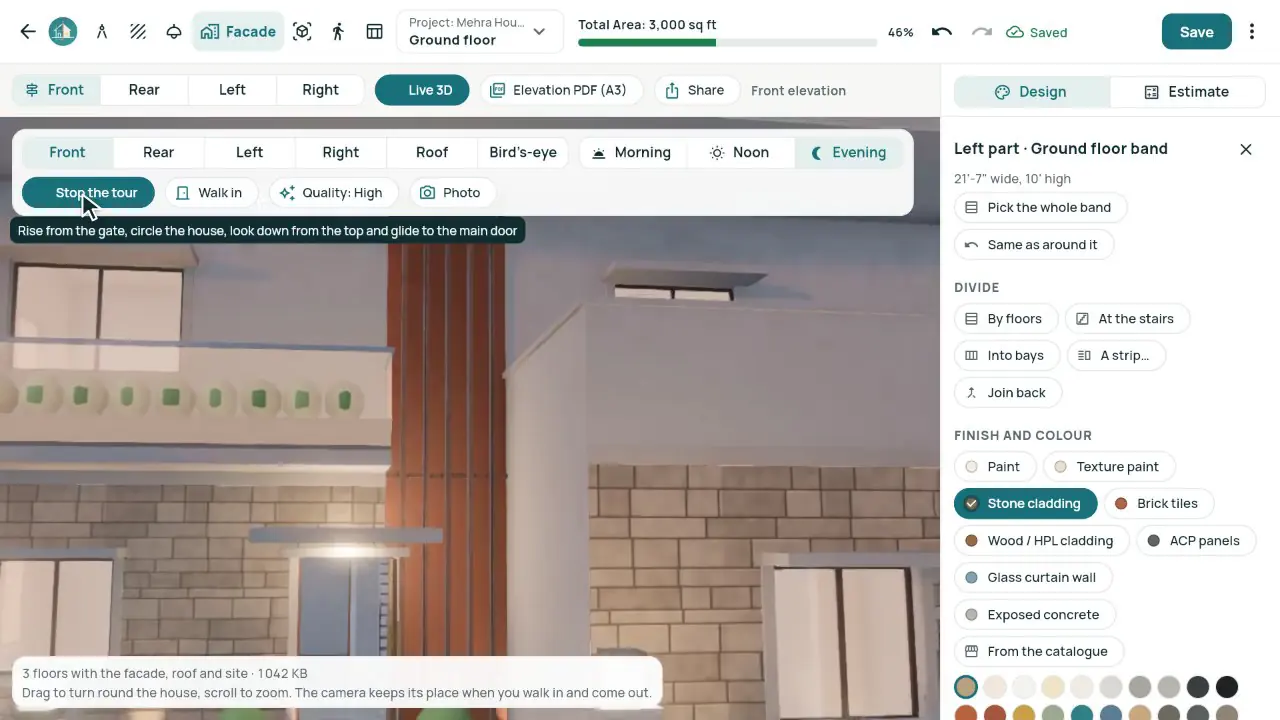
- Click a part of the wall (Shift-click to add more); Pick the whole band takes its whole floor band. Divide splits a part By floors, At the stairs, Into bays or into A strip.
- Give it a Finish and colour and add what goes On this wall: Louvers, Jaali / CNC screen, Balcony, Chajja or canopy, Band or cornice, Vertical garden, Facade lights, or Stand out (feature wall).
- With nothing picked, set the whole house: the walls, Plinth, Windows and doors, Main door, Roof and Site (boundary wall, gate, driveway).
- Check it in Live 3D (Front, Rear, Left, Right, Roof, Bird’s-eye; Morning, Noon, Evening; Drone tour). Then press Elevation PDF (A3), switch to Estimate, or Save as my facade style.
How the heights and the estimate are worked out
The heights come from the plan: the plinth is 1 ft 6 in, each floor rises by its wall height (10 ft by default) plus a 6 in slab, the parapet is 1,000 mm and the mumty over the stairs 2,400 mm plus its slab.
The estimate measures wall finishes in sq ft along the wall, less windows and doors; railings, chajjas, bands, window frames and the boundary wall by the running ft; lights and the gate by the piece.
It uses your studio’s Facade rates (Settings › Rates & estimates). Defaults include paint ₹28 and stone ₹220 per sq ft, a glass railing ₹2,200 per running ft and a gate ₹48,000.
The PDF puts each elevation on an A3 sheet at the largest standard scale that fits (1:50 to 1:500), with callouts, and ends with a Quantities page without prices.
Worked example
The demo house from our videos (Modern Family Residence, fictional): two floors, the road at the bottom, with the Contemporary Indian preset and the app’s default facade rates.
| Ground level | 0 |
|---|---|
| Plinth (ground floor) | +1 ft 6 in |
| First floor | +12 ft |
| Roof slab | +22 ft 6 in |
| Parapet top | +25 ft 9½ in |
| Mumty top | +30 ft 10½ in |
| Front wall area (less windows and doors) | 1,043.9 sq ft |
| Walls in paint: 3,347.1 sq ft × ₹28 | ₹93,719 |
|---|---|
| Walls in stone cladding: 337 sq ft × ₹220 | ₹74,136 |
| Plinth in stone: 256.5 sq ft × ₹220 | ₹56,425 |
| Wooden louvers (10 fins): 108.9 sq ft × ₹450 | ₹48,997 |
| Balcony: 63.5 sq ft × ₹380 | ₹24,146 |
| Glass railing: 24 running ft × ₹2,200 | ₹52,830 |
| Chajjas: 98 running ft × ₹480 | ₹47,049 |
| Band: 39 running ft × ₹220 | ₹8,588 |
| Window frames: 306.7 running ft × ₹260 | ₹79,729 |
| Wall washer lights: 9 × ₹2,400 | ₹21,600 |
| Uplight: 1 × ₹1,800 | ₹1,800 |
| Pergola: 116.3 sq ft × ₹650 | ₹75,563 |
| Terrace garden: 269.1 sq ft × ₹300 | ₹80,729 |
| Boundary wall: 208.2 running ft × ₹1,400 | ₹2,91,465 |
| Sliding gate: 1 × ₹48,000 | ₹48,000 |
| Driveway: 201.2 sq ft × ₹140 | ₹28,165 |
| Total | ₹10,32,939 |
Common mistakes
- Designing the facade before the plan is final: the elevations are made from the outer walls, so finish the plan first.
- Leaving the road side wrong: the Front elevation is the side facing the road.
- Reading the estimate as a quotation: it is an early estimate to plan with.
- Choosing a stone or wood from the 3D picture alone: the app draws its textures rather than photographing them, so see the real material at the shop.
Questions
Can I export the elevation to AutoCAD?
No. You get an A3 PDF, one sheet per elevation with callouts and a Quantities page; pictures come from Photo in 3D.
Can I save my own style?
Yes. Save as my facade style keeps it for the whole studio.
Can I pick any colour?
Colours come from 25 named swatches, not a free colour picker.
Does it work on a phone?
Phones can look at the outside in 3D (Exterior) but not design it.